One system to run the floor — from work step to shipped device.

WorkStepper digitizes the atomic unit of your process — the work step — and connects every step into a traceable, review-ready record.

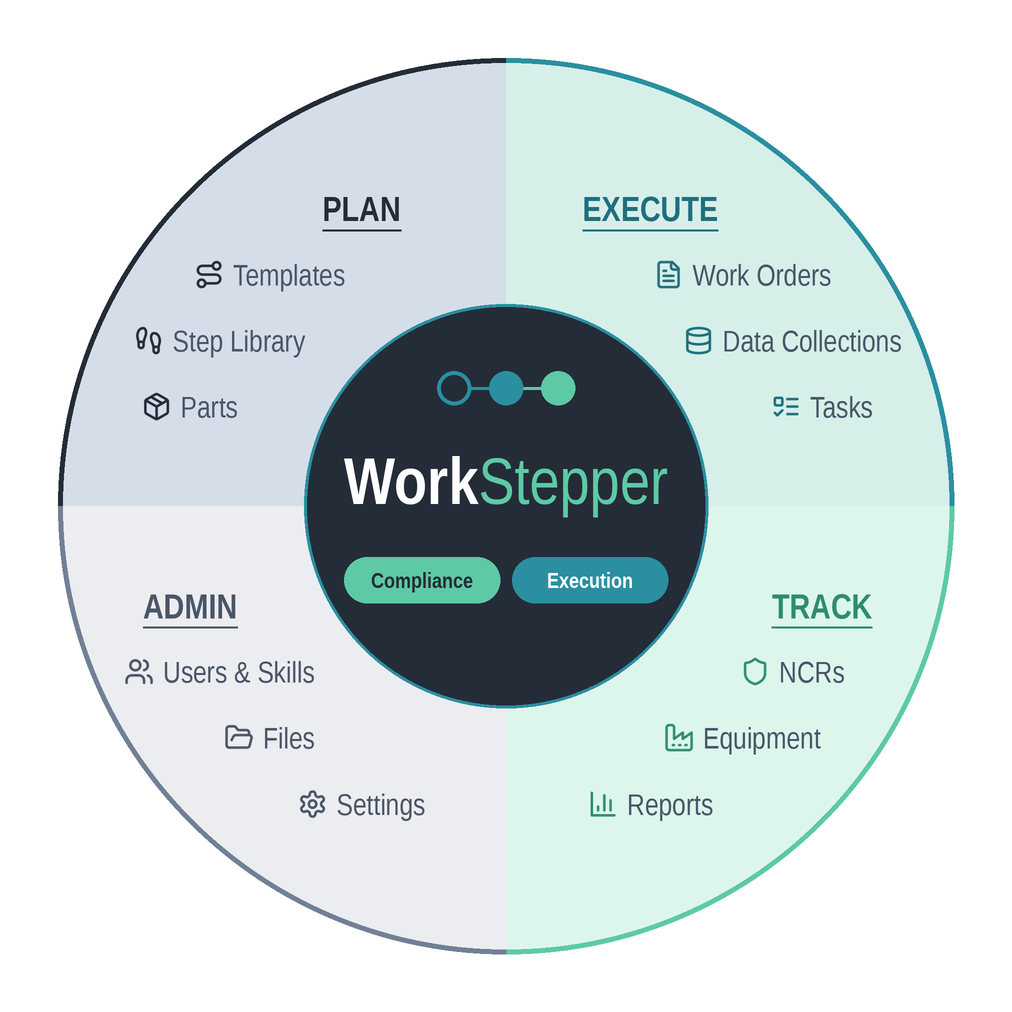
WorkStepper product architecture wheel: Plan, Execute, Admin, and Track modules surrounding one shared WorkStepper record built on Compliance and Execution.

How it fits together

Execution and compliance, in one record.

Every module — Plan, Execute, Track, and Admin — writes to the same WorkStepper record at the center. That record is built on two tenets at once: it drives execution on the floor and captures the compliance evidence as the work happens, so there's nothing to reconcile after the fact.

  • Execution — plan the build, run the work order, and track NCRs, equipment, and output in real time.
  • Compliance — signatures, data, and traceability are captured at the step, not assembled afterward.
  • One shared record — no reconciliation between systems.

What you get

From paper traveler to digital record.

These capabilities are what move your floor off paper and into a system you can review, audit, and improve.

Digital work instructions

Replace paper travelers with guided, enforced steps. Operators always run the current revision — no stale copies, no skipped steps. Branch logic and required checks keep the build on spec.

Paperless eDHR

Every signature, measurement, and check is captured automatically into a complete device history record. Review is built into the flow, so closing a record takes minutes instead of an afternoon.

Real-time floor visibility

See where every work order stands, what's blocked, and what's ready to ship. Handle nonconformances and route them for disposition without leaving the floor, and track lot and serial traceability or component consumption during the build when your ERP doesn't. Run your floor from a dashboard instead of a clipboard.

Module 01

Templates

Build the work instruction once. Control it for good.

Author digital work instructions step by step — standard builds, batch records, rework, and inspection/test plans. Each template carries its own revision, moves through a Draft → Review → Approved → Released lifecycle, and can be cloned or branched into a new revision without touching the released version operators are running.

The problem it solves

Paper instructions drift. Old revisions stay on the floor, edits happen in pen, and nobody can prove which version built which lot.

  • Upload existing work instructions and let AI parse them into structured template steps — review, edit, and release when ready.
  • Operators always run the current released revision — no stale copies in a binder.
  • Branch a new revision while the live one keeps running, then release when it's approved.
  • Import existing steps from CSV and reuse a shared Step Library across templates.

Inside the app

TemplatesTemplate Detail / Template EditorStep LibraryNew Template & CSV Import
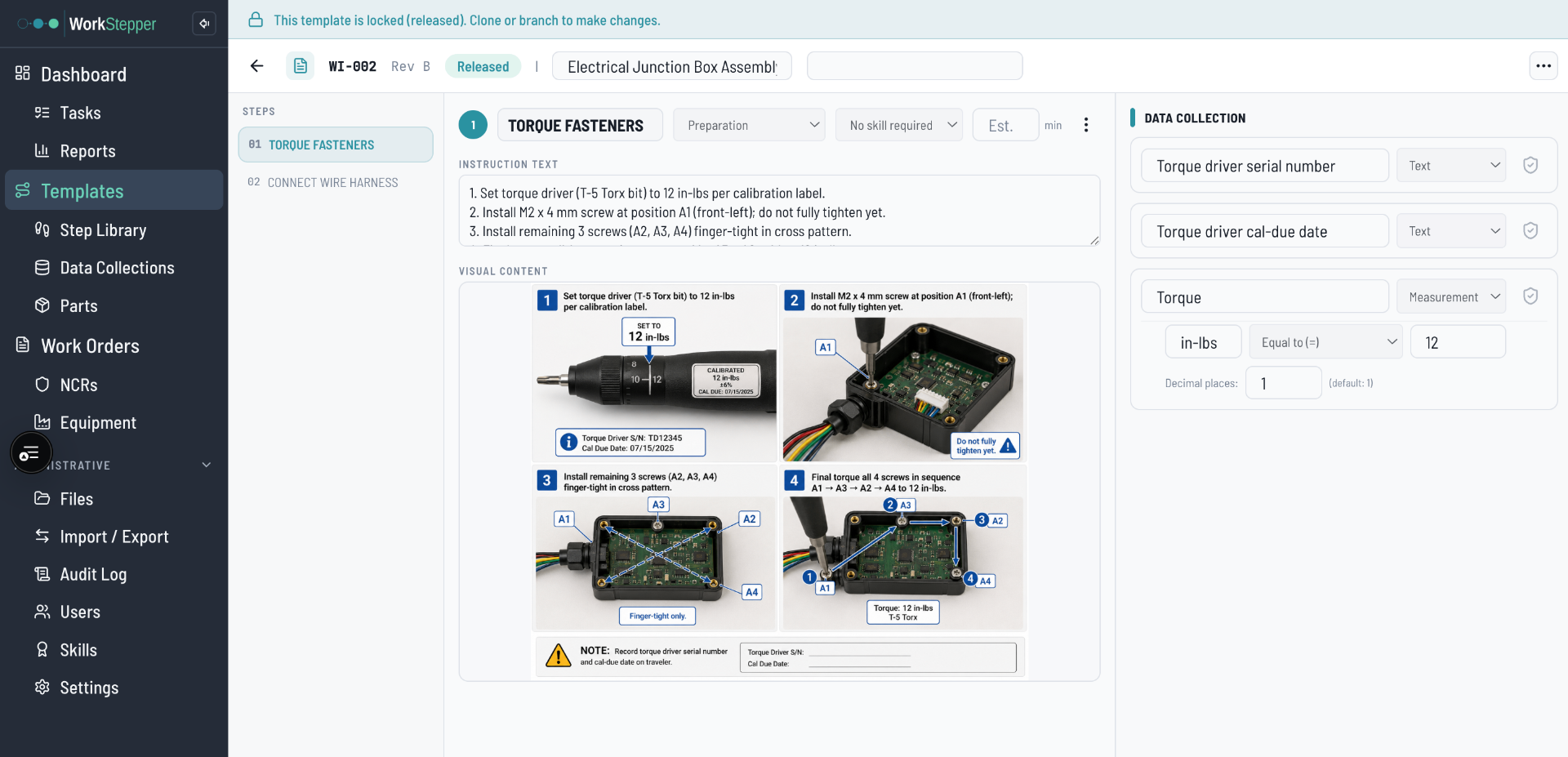
WorkStepper Templates — Template editor — building a released work instruction step by step
Templates in WorkStepper
Module 02

Work Orders

The traveler and the device history record, in one place.

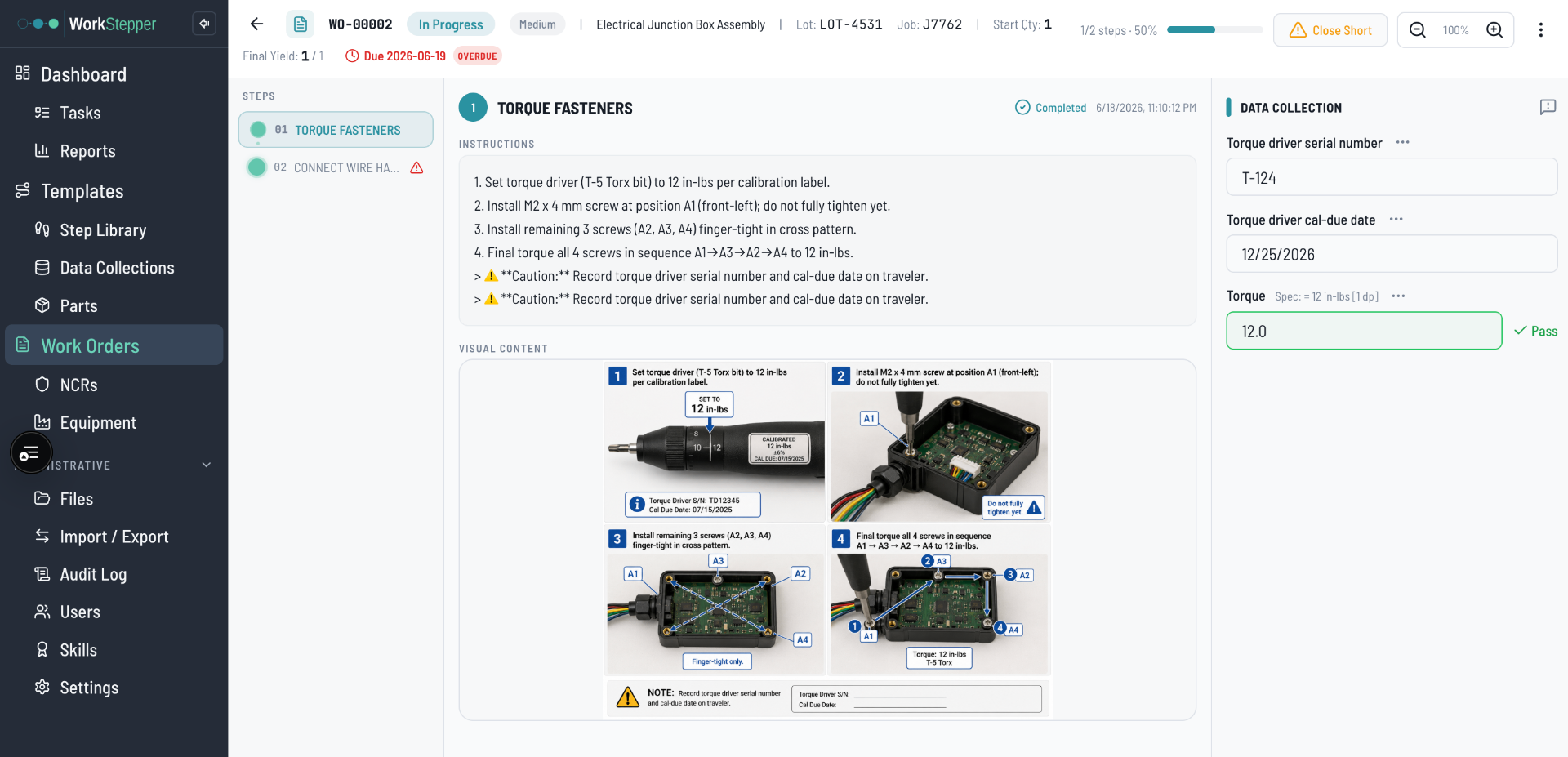
Issue a work order from a released template, attach the part, lot, serial, and quantity, and the floor runs the steps against it. Every entry, check, and signature is captured as the build happens — so the completed work order is the device history record, not a stack of paper you assemble afterward. Export a cover page or the full record to PDF when you need it on paper.

The problem it solves

Assembling a DHR from paper travelers after the fact is slow, error-prone, and the place audits go sideways.

  • Lot and serial captured on every unit, so genealogy is there when you need it.
  • The record closes as work finishes — review takes minutes, not an afternoon.
  • Batch view runs many units against one record; export to PDF for the binder or the customer.

Inside the app

Work OrdersWork Order DetailWork Order Batch ViewWork Order PDF & Cover Page Export
WorkStepper Work Orders — Work order in progress — steps, lot/serial, and live status
Work Orders in WorkStepper
Module 03

Data Collection

Define what gets recorded — and check it at the step.

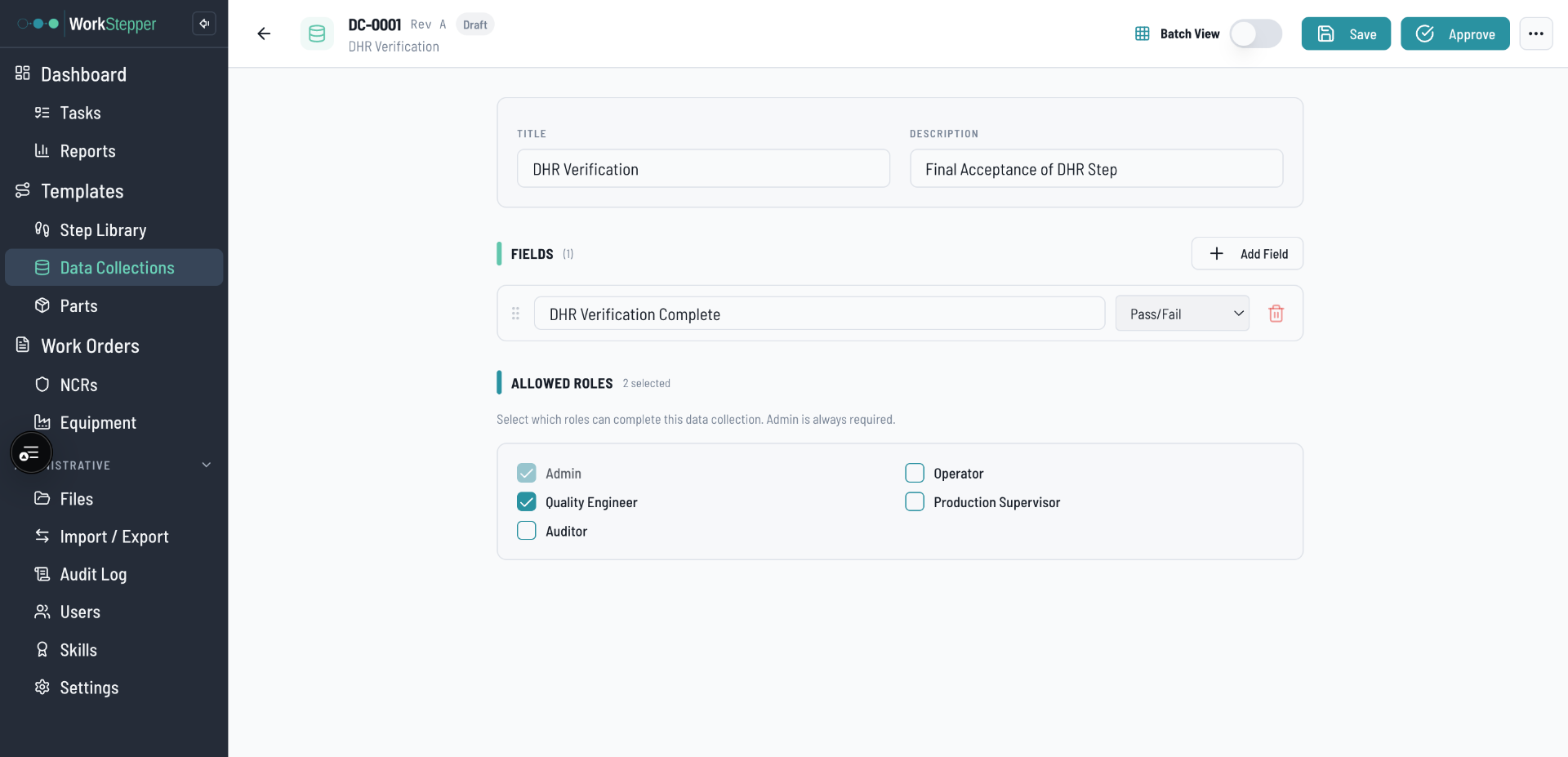
Build reusable data collection formats and attach them to template steps: measurements with units and spec limits, pass/fail checks, text, and material traceability lines. Like templates, collections are revision-controlled and released, so the data you capture on the floor is consistent across every build.

The problem it solves

Free-text on paper means missing fields, out-of-spec values that slip through, and data you can't actually analyze later.

  • Measurement fields carry spec limits, so out-of-tolerance entries are caught at the point of work.
  • Reuse one collection format across many templates instead of re-drawing tables.
  • Material traceability lines tie consumed parts and lots directly into the record.

Inside the app

Data CollectionsData Collection Detail / EditorMeasurement & Material Grid fields
WorkStepper Data Collection — Data collection editor — measurement fields with units and spec limits
Data Collection in WorkStepper
Module 04

Equipment Control

Calibrated and maintained — or it doesn't run the step.

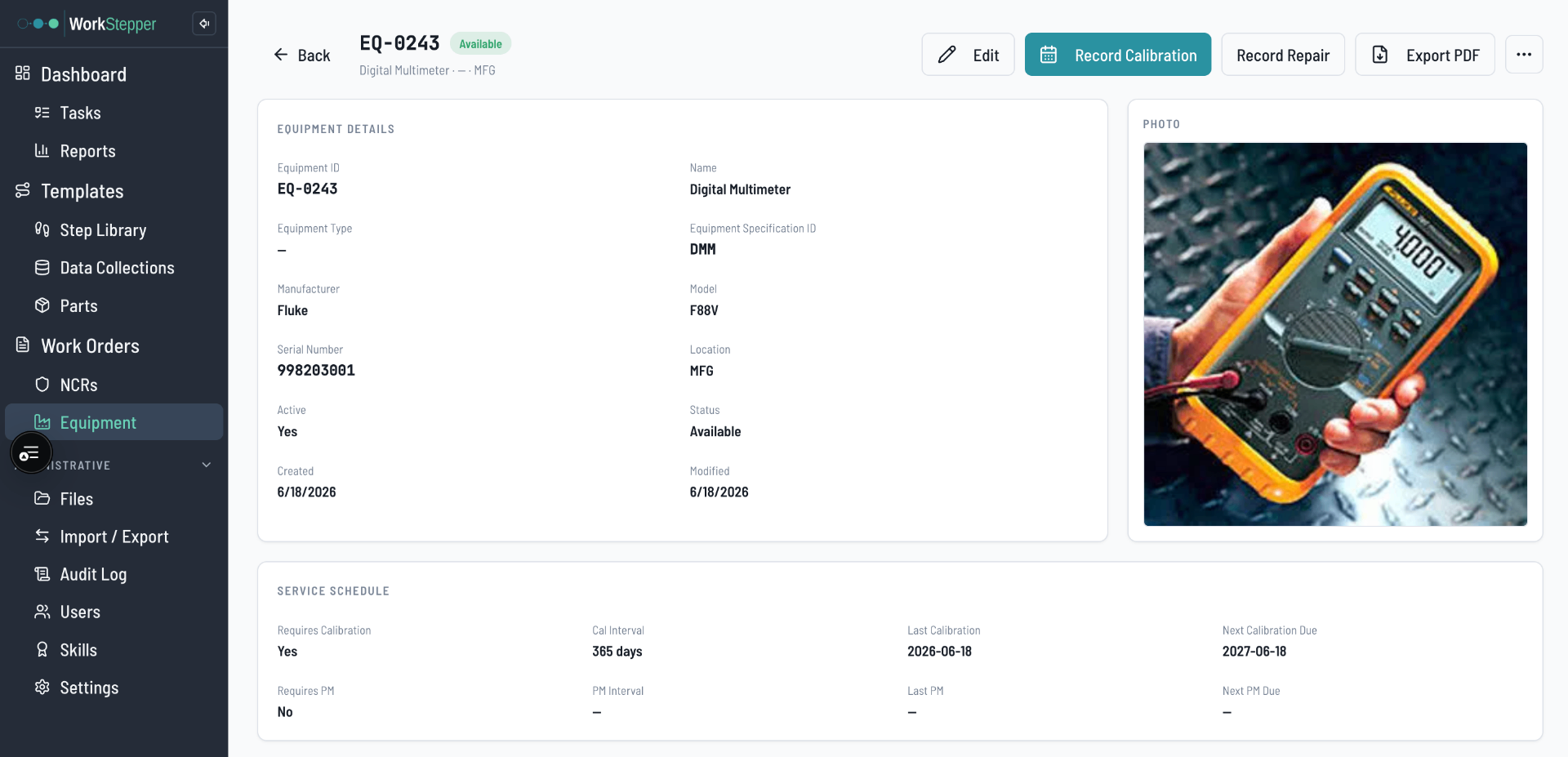
Track equipment with calibration and preventative-maintenance schedules, due dates, and full service history. Steps can require a specific calibrated instrument, so a build can't be recorded against a tool that's overdue or out of service. Statuses surface what's available, due soon, or overdue at a glance.

The problem it solves

Out-of-cal equipment on the floor can invalidate a whole lot — and spreadsheets don't stop it from being used.

  • Calibration and PM due dates with clear Available / Due Soon / Overdue status.
  • Steps requiring calibrated equipment block use of overdue or out-of-service tools.
  • Service history captured per asset and exportable to PDF for audits.

Inside the app

EquipmentEquipment DetailService Event & Calibration recordsStep Equipment Requirements
WorkStepper Equipment Control — Equipment list — calibration and PM status across the floor
Equipment Control in WorkStepper
Module 05

E-Signatures & Audit Trail

Every change signed, attributed, and impossible to lose.

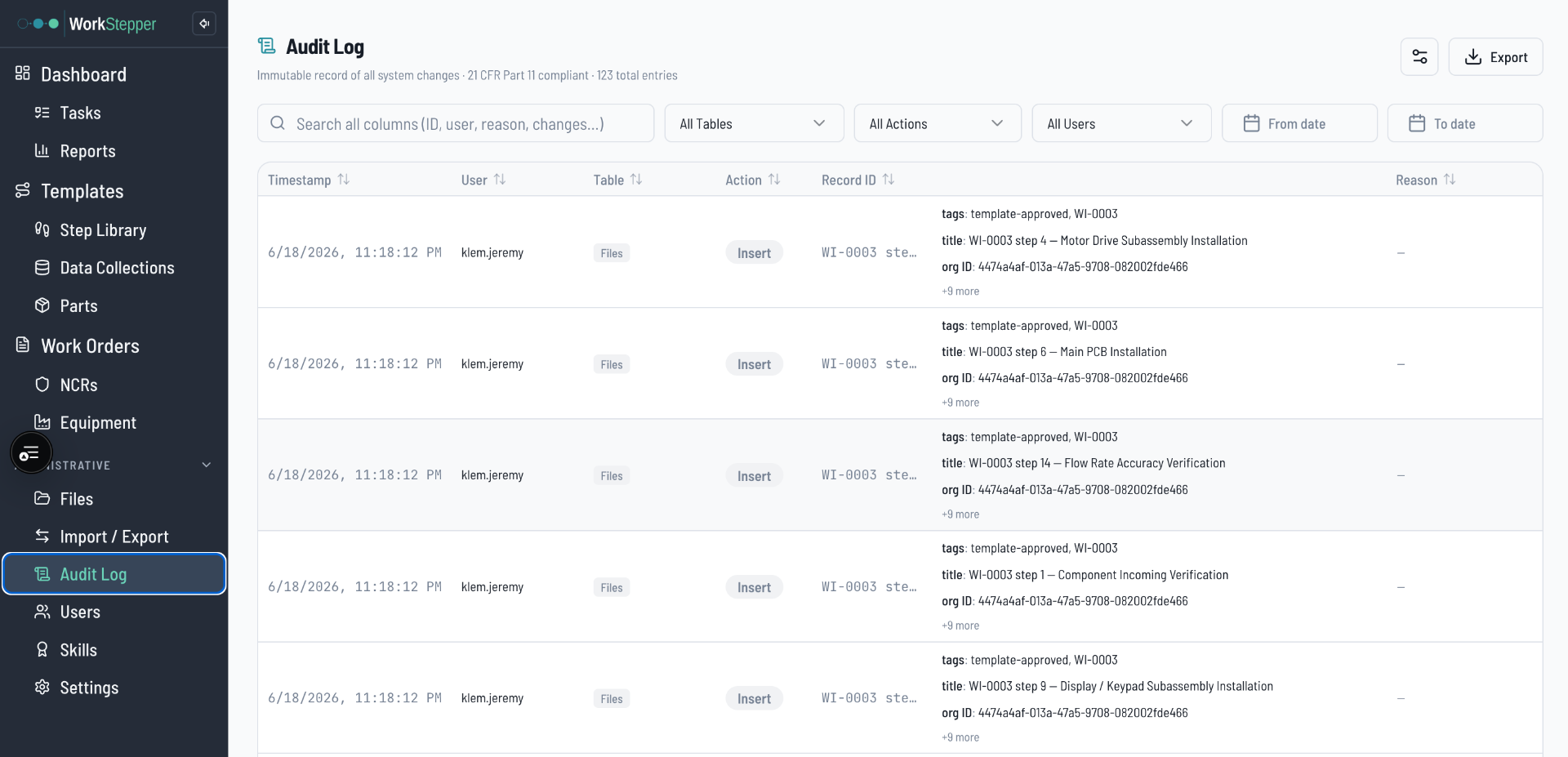
Regulated actions — approve, release, disposition, close — are captured with an electronic signature that records identity, intent, and timestamp. Behind it sits an immutable audit log of every change across the system: what changed, who changed it, when, and the reason. Approval gates and reason-for-change prompts enforce the workflow at the moment of the action.

The problem it solves

Paper signatures and wet-ink reason notes are hard to trace, easy to lose, and don't hold up to a Part 11 reviewer's questions.

  • Part 11 electronic signatures capture identity, intent, and timestamp on every signing event.
  • An immutable, filterable audit log spans templates, work orders, parts, equipment, and more.
  • Approval gates and reason-for-change keep the workflow enforced, not optional.

Inside the app

Audit LogElectronic Signature dialogApproval Gate & Reason-for-ChangePer-record Audit History
WorkStepper E-Signatures & Audit Trail — Audit log — every change, user, and reason, filterable and exportable
E-Signatures & Audit Trail in WorkStepper
Module 06

Validation & Compliance

Catch the problem before it reaches the floor.

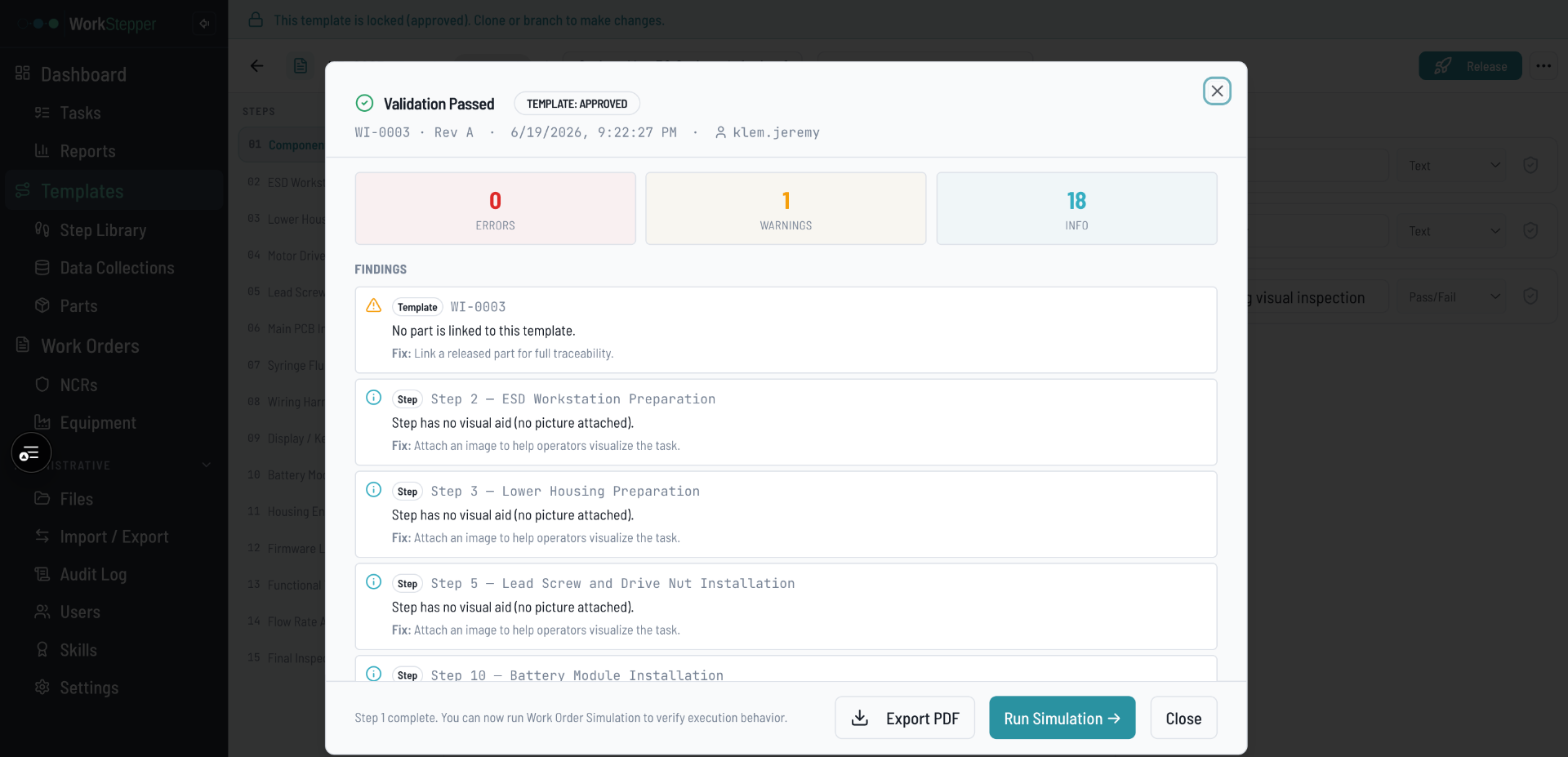
Run a validation check on a template before release to surface errors and warnings, then simulate a work order against it to confirm the build flows end to end. Configurable approval settings, role-based access, and nonconformance (NCR) handling keep the quality system enforced — and validation reports are saved with the detail a reviewer expects.

The problem it solves

A broken step or missing check only shows up mid-build, after the traveler is already on the floor.

  • Template validation flags errors and warnings before a revision is released.
  • Work order simulation proves the build runs before a real lot starts.
  • Nonconformances are logged in-system and linked back to the affected records.

Inside the app

Template ValidationWork Order SimulationApproval SettingsNCRs & NCR Detail
WorkStepper Validation & Compliance — Template validation report — errors and warnings before release
Validation & Compliance in WorkStepper
Module 07

Reports & Production Visibility

Run the floor from a dashboard, not a clipboard.

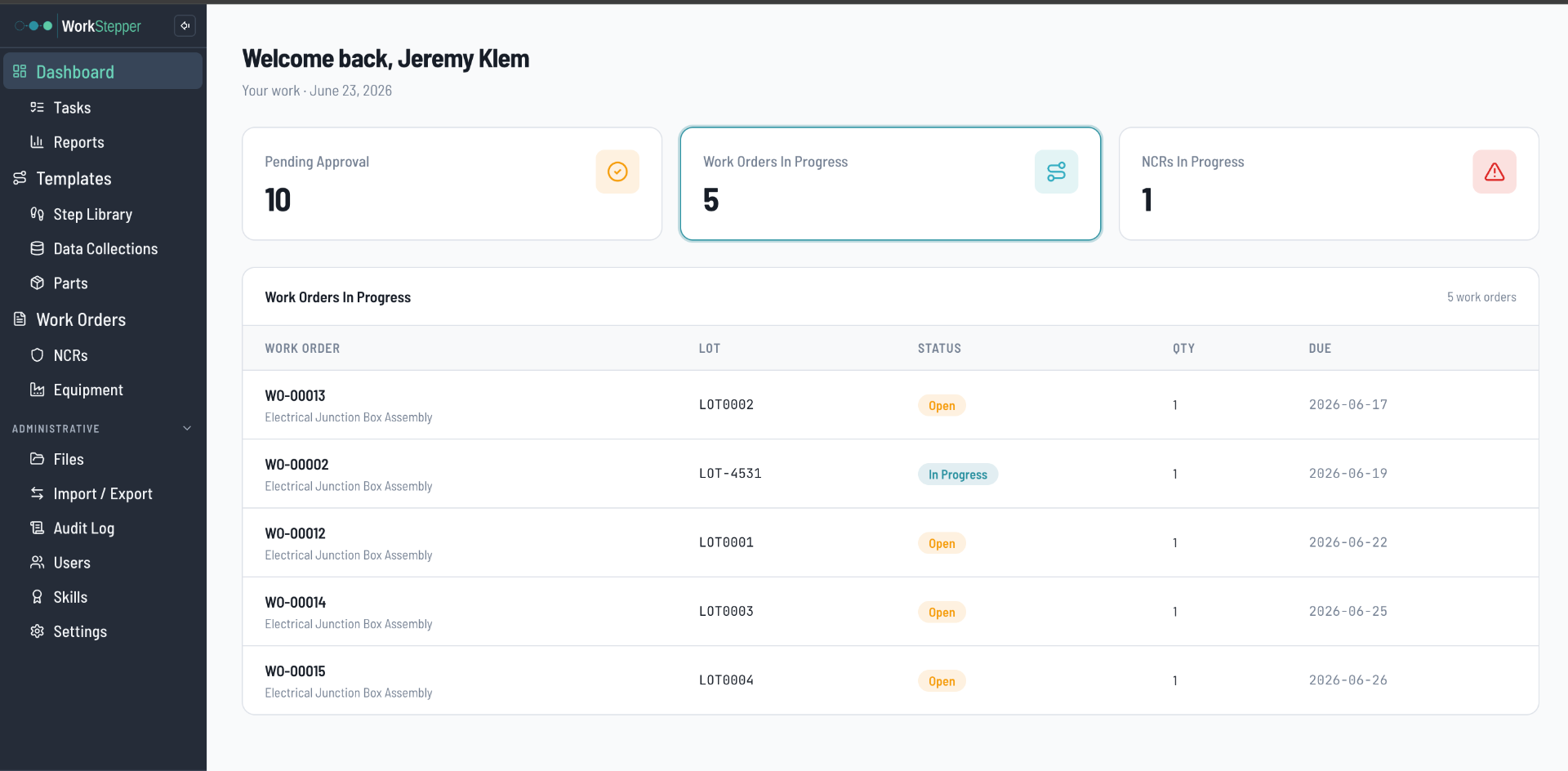
A dashboard surfaces what's in progress and what's waiting on approval the moment you log in. Built-in reports cover the core objects, and a report builder lets you create custom views across work orders, parts, equipment, and more — filtered, sorted, and exportable to CSV or PDF.

The problem it solves

Status lives in someone's head or a whiteboard, and pulling numbers for a review means a manual chase.

  • Dashboard buckets for work orders in progress, NCRs, and items pending approval.
  • A report builder for custom views across the objects you care about.
  • Export any report to CSV or PDF for reviews, customers, or auditors.

Inside the app

DashboardReportsReport BuilderTasks

Production dashboard — open work, NCRs, and approvals at a glance

Product screenshot placeholder
Reports & Production Visibility — product screenshot coming soon

Built to fit your team

Cloud-native. No servers, no IT team required.

WorkStepper runs in the cloud, so there's nothing to rack and nothing to patch. Your process, digitized — accessible from the floor, the office, or an auditor's conference room.

  • Cloud-hosted and always current — no upgrade projects.
  • Role-based access for operators, quality, and management.
  • Live in days, not months — configure your process and go.

Product walkthrough: a work order, start to finish

Demo video placeholder
Demo video — coming soon

Built on one record

The modules aren't separate apps. They're one system.

A released template issues a work order. The work order captures data, requires calibrated equipment, and collects signatures. Validation runs before release, and every action lands on the audit trail. Reports read it all. That's why nothing has to be reconciled between systems after the fact.

Medical device production area with operators running digital work instructions at the bench

Put a number on it.

Add your technicians, work orders, and labor rate. See the labor hours and dollars WorkStepper gives back — every month and every year.

What will WorkStepper save me?

On the roadmap

Where the platform is headed next.

Natural next modules that build on the records you already keep. These are planned, not yet in the app — we'll be straight with you about what's live and what's coming.

Roadmap

Training & Qualification

Tie operator skills and training records to the steps they're allowed to run. Today the Skills module tracks qualifications; a full Training module is on the roadmap.

Roadmap

Process FMEA

Connect failure modes and risk controls to the steps and checks that mitigate them. Planned — not yet in the app.

Roadmap

Equipment Qualification

Extend equipment records with IQ/OQ/PQ qualification protocols alongside calibration and PM. Planned — not yet in the app.

See these modules on your own work instructions.

Bring a paper traveler. We'll show you the template, the work order, and the record it becomes.